Text (SMS) Campaigns
Send text blasts to opted-in customers using your own Twilio number. Connect Twilio, compose a message, preview your SMS audience, and track delivery in the text log.
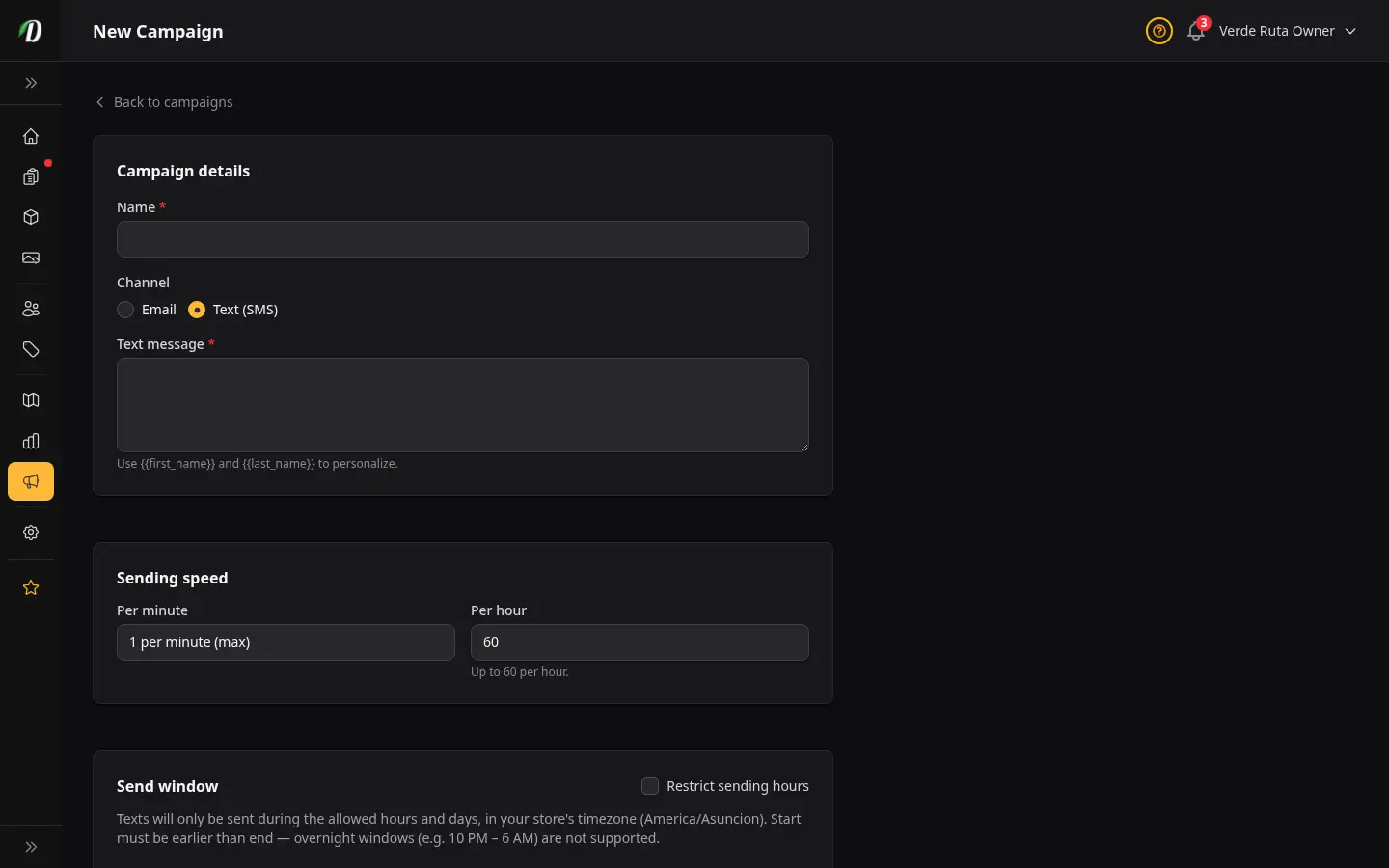
Inicio Rápido
- Abre Configuración → Integraciones y conecta tu cuenta de Twilio (Account SID, Auth Token y número de envío).
- Abre Marketing → Campañas y haz clic en Nueva Campaña.
- Elige Texto (SMS) como canal y escribe tu mensaje. Usa
{{first_name}}para personalizar. - Revisa la vista previa de la audiencia — solo se incluyen clientes de la tienda con opt-in y un número móvil válido.
- Haz clic en Enviar Ahora y sigue el progreso en la página de estadísticas de la campaña.
Trae Tu Propio Twilio
DabDash no envía textos desde un número compartido de la plataforma. Conectas tu propia cuenta de Twilio, envías desde tu número y pagas a Twilio directamente. Copia la URL del webhook de estado desde la página de integraciones en tu consola de Twilio para que los resultados de entrega vuelvan a tu Registro de textos.
Quién Recibe Textos de Marketing
- Clientes existentes de la tienda con un teléfono registrado que no hayan optado por no recibir textos de marketing.
- Solo se incluyen números clasificados como móviles válidos. Líneas fijas, VoIP y números aún en verificación se omiten.
- Las listas de contactos importadas no se usan para campañas de texto — los envíos masivos de SMS van solo a tu base de clientes.
- Los números que respondieron STOP o fallaron de forma definitiva se omiten automáticamente.
Listas Inteligentes para Campañas de Texto
Puedes elegir una Lista Inteligente para dirigirte a un segmento activo, como clientes inactivos durante 90, 180 o 365 días, clientes que compraron recientemente de una categoría o clientes de alto valor. Las Listas Inteligentes muestran la insignia Lista Inteligente y se evalúan con los datos actuales de clientes y pedidos.
El segmento permanece activo hasta que la campaña se lanza. La vista previa de un borrador puede cambiar y una campaña programada evalúa el segmento cuando comienza el envío. Al comenzar el envío, los destinatarios elegibles quedan fijados en la instantánea de esa campaña; los pedidos, bajas o cambios posteriores en la Lista Inteligente no agregan destinatarios a ese envío.
El consentimiento para SMS es independiente del consentimiento para correo electrónico. Las Listas Inteligentes de texto solo incluyen clientes con opt-in documentado para SMS, un móvil válido, sin baja mediante STOP y sin fallo definitivo de entrega. Las listas de contactos importadas no se usan para campañas de texto. El historial por categoría usa la categoría actual del producto, por lo que mover un producto puede cambiar una coincidencia histórica.
Verificación Opcional del Teléfono
En Configuración → Notificaciones, puedes activar Verificar teléfono antes de textos de marketing después de conectar Twilio. Está desactivado por defecto. Cuando está activo, los clientes que optan por textos de ofertas en el checkout o en su perfil pueden verificar con un código de un solo uso. Los pedidos siguen procesándose si omiten la verificación — simplemente no se añaden a campañas de texto hasta que su número esté verificado.
Conceptos Básicos de Cumplimiento
Los envíos masivos de texto de marketing requieren opt-in documentado. Mantén los textos promocionales separados de las actualizaciones transaccionales de pedidos. Respeta las respuestas STOP de inmediato — DabDash registra las bajas en el registro del cliente. Revisa TCPA, CASL y las normas locales de publicidad de cannabis en tu mercado antes del primer envío.
Preguntas Frecuentes
¿Cómo envío un envío masivo de texto en DabDash?
Conecta Twilio en Configuración → Integraciones, luego ve a Marketing → Campañas, haz clic en Nueva Campaña, elige Texto (SMS) como canal, escribe tu mensaje (se recomiendan 160 caracteres), revisa la audiencia de clientes con opt-in y haz clic en Enviar Ahora.
¿Necesito mi propia cuenta de Twilio para campañas SMS?
Sí. DabDash usa bring-your-own Twilio: conectas tu cuenta, envías desde tu número y pagas a Twilio directamente por mensaje. DabDash encola los envíos y registra la entrega; no proporciona un número compartido de la plataforma.
¿Quién puede recibir una campaña de texto de marketing en DabDash?
Solo clientes existentes de la tienda que no hayan optado por no recibir textos de marketing y cuyo número esté clasificado como móvil válido. Las listas de contactos importadas no se usan para campañas SMS. Los números que respondieron STOP o fallaron de forma definitiva se excluyen automáticamente.
¿Dónde veo los resultados de entrega de textos en DabDash?
Abre Configuración → Registro de textos para ver cada SMS saliente — campañas, actualizaciones transaccionales de pedidos y respuestas del buzón — con el estado de entrega desde los callbacks de Twilio.